
What to Look for in a Ticket Builder for Live Events
A ticket builder is not just the place where you type in the ticket name and price. For live events, it becomes the control room for demand, buyer friction, payout timing and the guest list your team will rely on at the door.
That matters because live events have pressure points that ecommerce products do not. A shirt can be restocked. A show date cannot. A confusing ticket tier, delayed payout or broken promo code can affect cash flow before the event and operations on the night itself.
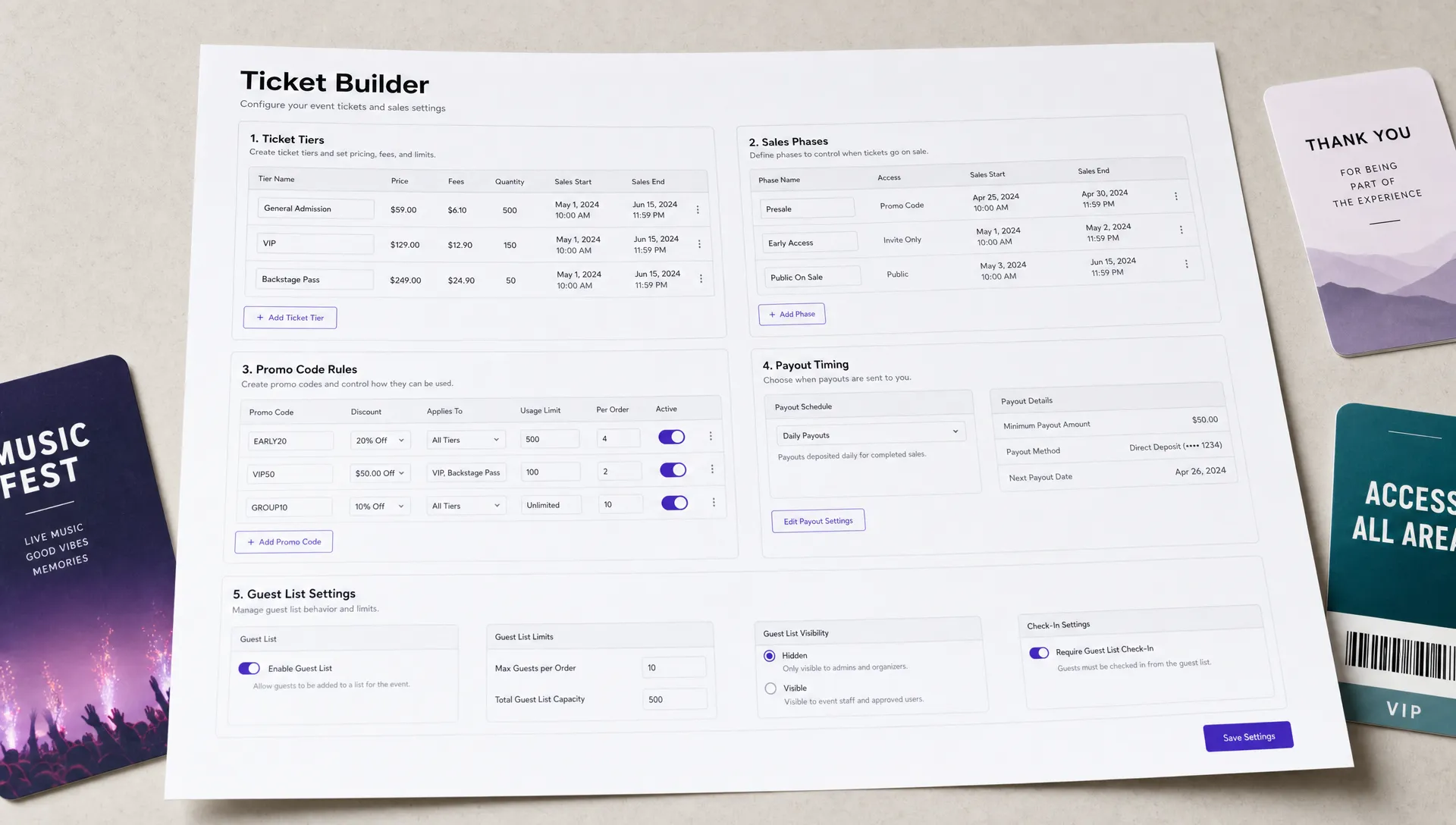
The right ticket builder should help you launch fast without forcing you into shortcuts. It should let you build tiers, control sales phases, customize the buyer experience, manage discounts and keep a clean attendee list. For music producers, club promoters, workshop hosts, conference teams and independent organizers, those details can decide whether ticketing feels like an asset or another job to manage.
Start With the Real Job of a Ticket Builder
A good ticket builder should turn your event plan into a clear buying flow. That sounds simple, but the builder has to handle several things at once: what people can buy, when they can buy it, how much they pay, what information they receive and how your team validates entry.
If a platform treats ticket creation as a basic form, you will often end up with manual workarounds. You might need to hide sold-out tickets yourself, send separate discount links, update phases by hand or reconcile multiple guest lists before doors open.
Use this simple framework when evaluating a ticket builder:
| Organizer need | What the ticket builder should support | Why it matters |
|---|---|---|
| Fast setup | Clear event creation, ticket tiers and checkout preview | Reduces launch delays and setup mistakes |
| Revenue control | Pricing tiers, sales phases, capacity limits and promo rules | Helps protect margins and shape demand |
| Buyer conversion | Mobile-friendly checkout, clear fees and no unnecessary account creation | Reduces drop-off before purchase |
| Cash flow | Transparent fees and reliable payout options | Helps organizers pay vendors, venues and talent |
| Show-day operations | Digital guest lists and clean attendee data | Makes check-in easier and less error-prone |
The best ticket builder is not necessarily the one with the longest feature list. It is the one that lets you make the right decisions quickly, then gives you control when the event starts moving.
Look for a Setup Flow That Matches How Events Are Planned
Most organizers do not build an event in a perfectly linear order. You may know the venue and date before ticket prices are final. You may have an early bird plan but still be confirming VIP perks. You may want to publish the event page before every promo code is ready.
A useful ticket builder should support that reality. It should let you save drafts, review the buyer journey and adjust core event details without rebuilding everything from scratch. The setup flow should make essential decisions visible, including event date, time zone, capacity, ticket availability, refund language, taxes, fees and door policy.
The preview step is especially important. Before you share the event link, you should be able to see what a buyer sees: the event page, ticket options, checkout steps and confirmation experience. Small wording issues become obvious in preview. A ticket called “Phase 2 GA” may make sense to your team, but “General Admission, Second Release” is clearer to a first-time buyer.
For live events, speed is useful only when it does not hide risk. A builder that lets you launch in minutes should still force clarity around the details that affect revenue and attendance.
Make Sure Ticket Tiers Are Flexible Enough
Ticket tiers are where your pricing strategy becomes real. General admission, early bird, VIP, group tickets, backstage passes, member presales and complimentary tickets all serve different purposes. If the builder makes tier creation rigid, your strategy becomes rigid too.
At minimum, look for the ability to create multiple ticket tiers with separate prices, quantities, sale windows and descriptions. If your event has different buyer segments, the ticket builder should not force every buyer into the same offer.
This is especially important for music events and nightlife. A promoter might use an early access tier to build momentum, a general admission tier for the main sales window, a VIP tier for higher-margin buyers and complimentary tickets for artists, partners or press. A conference organizer may need student pricing, team passes and sponsor allocations.
If you are still deciding which ticket types fit your event, TixFlow has a practical guide on choosing the right type of ticket for any event. The builder you choose should be able to support that strategy rather than limit it.
A strong ticket builder gives you room to define the offer clearly:
| Ticket tier control | What to check before choosing a platform |
|---|---|
| Tier quantity | Can each tier have its own inventory limit? |
| Sale timing | Can tickets open and close automatically? |
| Buyer-facing description | Can you explain what is included without clutter? |
| Visibility | Can you hide, show or schedule ticket types? |
| Complimentary access | Can you manage guest or comp tickets cleanly? |
| Upsell potential | Can premium tiers stand out without confusing GA buyers? |
Unlimited ticket tiers can be valuable, but only if the builder keeps them manageable. Too many visible options can slow buyers down. The goal is not to create every possible ticket. The goal is to create enough structure to match demand, protect capacity and make the buying choice obvious.
Prioritize Automated Sales Phases
Manual ticket changes are easy to forget during a campaign. If early bird pricing is supposed to end Friday night, someone has to remember to update it. If a presale should open to the public at noon, someone has to be online at noon. A ticket builder with automated sales phases reduces that operational load.
Sales phases are useful because they let you plan urgency ahead of time. Early access, first release, second release, final release and door pricing all become part of a controlled timeline rather than a set of manual edits.
Automation is not only about convenience. It helps cash flow. If a lower-priced tier sells out or expires on schedule, you can move buyers into the next tier without delay. If your pricing strategy depends on demand increasing over time, missed phase changes can cost real money.
A good builder should make sales timing clear enough that your team can audit it. You should be able to answer basic questions without digging through settings: when does this tier go live, when does it close, how many tickets are available and what happens when it sells out?
For organizers building a more deliberate price ladder, this connects directly to your broader event pricing strategy. The ticket builder is where that strategy either runs cleanly or turns into manual admin.
Reduce Checkout Friction as Much as Possible
The buyer’s job should be simple: choose a ticket, pay and receive confirmation. Every extra step increases the chance that someone leaves before completing the purchase.
Baymard Institute’s ongoing cart abandonment research places average ecommerce cart abandonment around 70%. Live event ticketing is not identical to retail ecommerce, but the lesson carries over. Forced account creation, surprise fees, unclear payment steps and slow mobile checkout all create friction at the worst possible moment.
For a ticket builder, checkout quality matters as much as ticket setup. Look for a platform that lets attendees buy without unnecessary registration, especially if your audience is arriving from Instagram, SMS, email or a last-minute artist announcement. Buyers who tap a link on their phone should not have to create an account before they can commit.
Fee visibility also affects trust. If fees appear late in the process, buyers may feel misled even if the final price is reasonable. A better checkout experience makes the total cost easy to understand and keeps the path to payment short.
TixFlow is built around a no buyer registration checkout, customizable event pages and flat per-ticket fees, which are all relevant if your priority is reducing friction while keeping costs predictable.
Evaluate Cash Flow Features Before You Launch
Ticket sales are often the money that funds the event before it happens. Organizers may need cash to pay deposits, confirm production, book talent, run ads or cover staffing. If your ticketing platform holds funds too long, your event can look successful on paper while your operating cash is still tight.
A ticket builder should make payout timing and fee structure easy to understand before you publish. Ask how payouts work, whether funds are available before the event, what fees apply to each ticket and how refunds or disputes are handled. The answers can affect your budget more than a small difference in design features.
TixFlow offers instant payouts, flat per-ticket fees and Stripe Connect integration. Stripe Connect is widely used for marketplace and platform payments, and Stripe explains its platform payment model in its Connect documentation. For organizers, the practical point is simple: payment infrastructure should be reliable, understandable and aligned with your need to control cash flow.
If this is a major concern for your team, it is worth reading more about how ticketed events can build predictable cash flow. Your ticket builder should support the way your event actually spends money, not just the way it collects orders.
Check Real-Time Controls for When Plans Change
Live events change. A partner asks for a new allocation. A ticket tier sells faster than expected. A sponsor needs a code. You decide to extend a phase by six hours after a strong announcement. The ticket builder should let you respond without opening a support ticket for every adjustment.
Real-time sales control is one of the most important features for active organizers. You should be able to adjust ticket availability, pause or close tiers, update event page copy and manage promo activity while the campaign is live. Those changes should be reflected quickly so buyers do not see outdated information.
This is not only useful for large events. Smaller independent events often need even more flexibility because the team is lean. The same person may be handling artist relations, paid ads, ticketing and guest list management. A builder that requires too many manual steps can slow down the entire operation.
The control panel should feel clear under pressure. If you would not trust yourself to make a quick change on show week, the interface is probably too complicated.
Look for Promo Codes That Protect Your Margins
Promo codes can be powerful, but weak discount controls can quietly damage revenue. A generic code shared too widely may reduce margin on buyers who would have paid full price. A code without an expiration date may keep circulating after its intended window.
A strong ticket builder should let you create discounts with clear rules. Common controls include code names, usage limits, expiration dates, ticket tier eligibility and fixed or percentage discounts. Some events also need private codes for partners, artists, sponsors, street teams or loyal customers.
The goal is to make promotions measurable. If a DJ has a code, you should be able to see how many tickets it moved. If a sponsor gets an allocation, you should know whether it was used. If a flash sale is meant to last 24 hours, the builder should help enforce that timeline.
TixFlow includes smart promo codes, which can be useful for organizers who rely on targeted campaigns rather than one public discount blasted across every channel.
Brand Control Should Extend Beyond the Event Page
A buyer often forms trust before they reach checkout. The event page, ticket descriptions, images, price display and confirmation flow all contribute to that trust. A generic or cluttered page can make a legitimate event feel less credible than it is.
Your ticket builder should let you customize the event page enough to match the brand of the show. That does not mean every organizer needs a fully custom website. It means your page should communicate the event promise clearly: who is performing or speaking, where it happens, when doors open, what each ticket includes and what the buyer receives after purchase.
For music producers and promoters, brand consistency can also support sharing. An event page that looks aligned with the artist, label or venue is easier to promote across social channels. For conferences and workshops, a clear page helps justify the purchase to a team lead or finance contact.
Customization should not come at the cost of clarity. The best ticket builder gives you enough control to make the page feel like your event while keeping the checkout path obvious.
Do Not Ignore Guest List and Door Operations
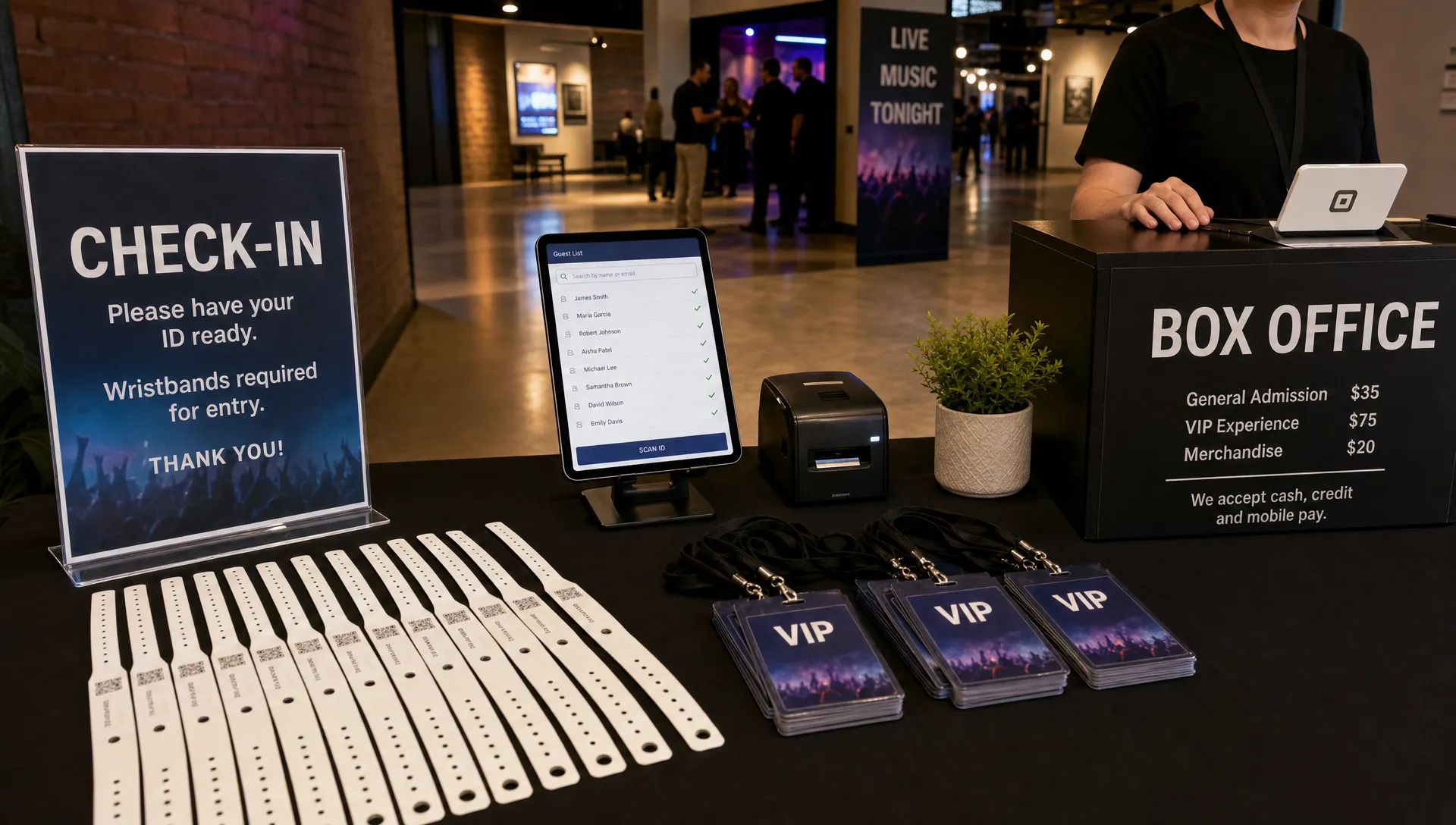
Ticketing is not finished when the buyer pays. For live events, the system has to carry accurate attendee data through to check-in. If your door team is working from messy exports, duplicate lists or last-minute spreadsheets, the buyer experience can fall apart at the entrance.
Look for a ticket builder that creates clean digital guest lists. The list should make it easy to see attendee names, ticket types and relevant access details. VIPs, comps, staff allocations and general admission buyers should not be mixed together in a way that causes confusion.
For venues with fast entry windows, small delays add up. If 200 people arrive in a 20-minute rush, your guest list process needs to be simple enough for staff who may not have been involved in ticket setup. The more complex your ticket structure is, the more important clean door data becomes.
TixFlow includes digital guest lists, which helps connect ticket creation with show-day execution instead of treating them as separate tasks.
Security and Payment Trust Are Non-Negotiable
Buyers need to trust the checkout before they enter payment details. Organizers need to trust that payment handling is stable, compliant and not dependent on fragile workarounds. A ticket builder should make secure payment processing part of the core experience rather than an afterthought.
You do not need to become a payments engineer, but you should ask practical questions. Who processes the payment? How are organizer accounts verified? How are payouts handled? What happens if a buyer disputes a charge? Can the platform support your business structure as you grow from small events to larger campaigns?
Trust also includes communication. Confirmation emails, ticket delivery and receipt details should be clear. If buyers do not understand whether their purchase went through, your team will spend more time answering support messages.
Questions to Ask Before Choosing a Ticket Builder
Before you commit to a platform, review it through the full event lifecycle: setup, launch, active sales, payout and check-in. A tool that looks good during setup may still fail when you need to edit tiers quickly or reconcile the guest list.
| Question | Strong sign | Red flag |
|---|---|---|
| Can I create the ticket structure I actually need? | Multiple tiers, clear descriptions and flexible availability | Workarounds for common tickets like VIP or early bird |
| Can I automate price changes or phase timing? | Scheduled sales phases | Manual updates required for every change |
| Is checkout fast on mobile? | Short purchase path and no unnecessary registration | Forced account creation before purchase |
| Do I understand the fees? | Simple fee model shown before launch | Unclear platform or buyer fees |
| Will payouts match my cash flow needs? | Clear payout timing and payment setup | Funds held longer than your event budget allows |
| Can my team manage the door from this system? | Digital guest list with useful ticket details | Manual spreadsheets or messy exports |
A ticket builder should answer these questions before you start selling. If you only discover limitations after tickets are live, your options become more limited.
A Practical Ticket Builder Checklist
Use this checklist when comparing platforms for your next live event:
- Fast event setup with a clear preview of the buyer experience
- Flexible ticket tiers for GA, VIP, early access, groups and comps
- Automated sales phases for presales, early bird windows and final releases
- Mobile-friendly checkout with no unnecessary buyer registration
- Transparent fees that help you forecast net revenue
- Reliable payout options that support event cash flow
- Real-time control over ticket availability and event page updates
- Promo codes with rules that prevent margin leaks
- Customizable event pages that match your brand
- Digital guest lists that simplify check-in
You may not need every advanced feature for every event. A 75-person listening party and a 3,000-person festival have different needs. But the core requirement is the same: the builder should let you sell confidently, adapt quickly and operate cleanly on the day of the event.
Frequently Asked Questions
What is a ticket builder for live events? A ticket builder is the tool organizers use to create ticket types, set prices, define availability, manage sales phases and connect purchases to guest lists or check-in operations.
What features matter most in a ticket builder? The most important features are flexible ticket tiers, fast mobile checkout, transparent fees, automated sales phases, reliable payouts, promo code controls, real-time edits and digital guest list management.
Why does no buyer registration matter? Required registration adds friction at the moment someone is ready to buy. For live events promoted through social media, text or email, a shorter checkout can help reduce drop-off.
How does a ticket builder affect cash flow? The builder controls pricing structure, sales timing, fees and payout access. These factors influence when money comes in, how much net revenue you keep and whether you can fund event costs before doors open.
Should small events use advanced ticket tiers? Small events should use only the tiers that make the buying decision clearer or improve revenue. Early bird, GA, VIP and comp tickets can be useful, but too many choices can confuse buyers.
Build Your Next Event With Less Friction
If you want a ticket builder designed for modern live events, TixFlow gives organizers instant payouts, flat per-ticket fees, no buyer registration, unlimited ticket tiers, automated sales phases, smart promo codes, customizable event pages, real-time sales control and digital guest lists.
Whether you are producing a show, launching a community event or managing ticket revenue as part of a larger event budget, the right platform should help you move faster without losing control. Explore TixFlow and build a ticketing flow that works for your buyers, your team and your cash flow.