
Create a Ticketed Event With a Simple Sales Plan
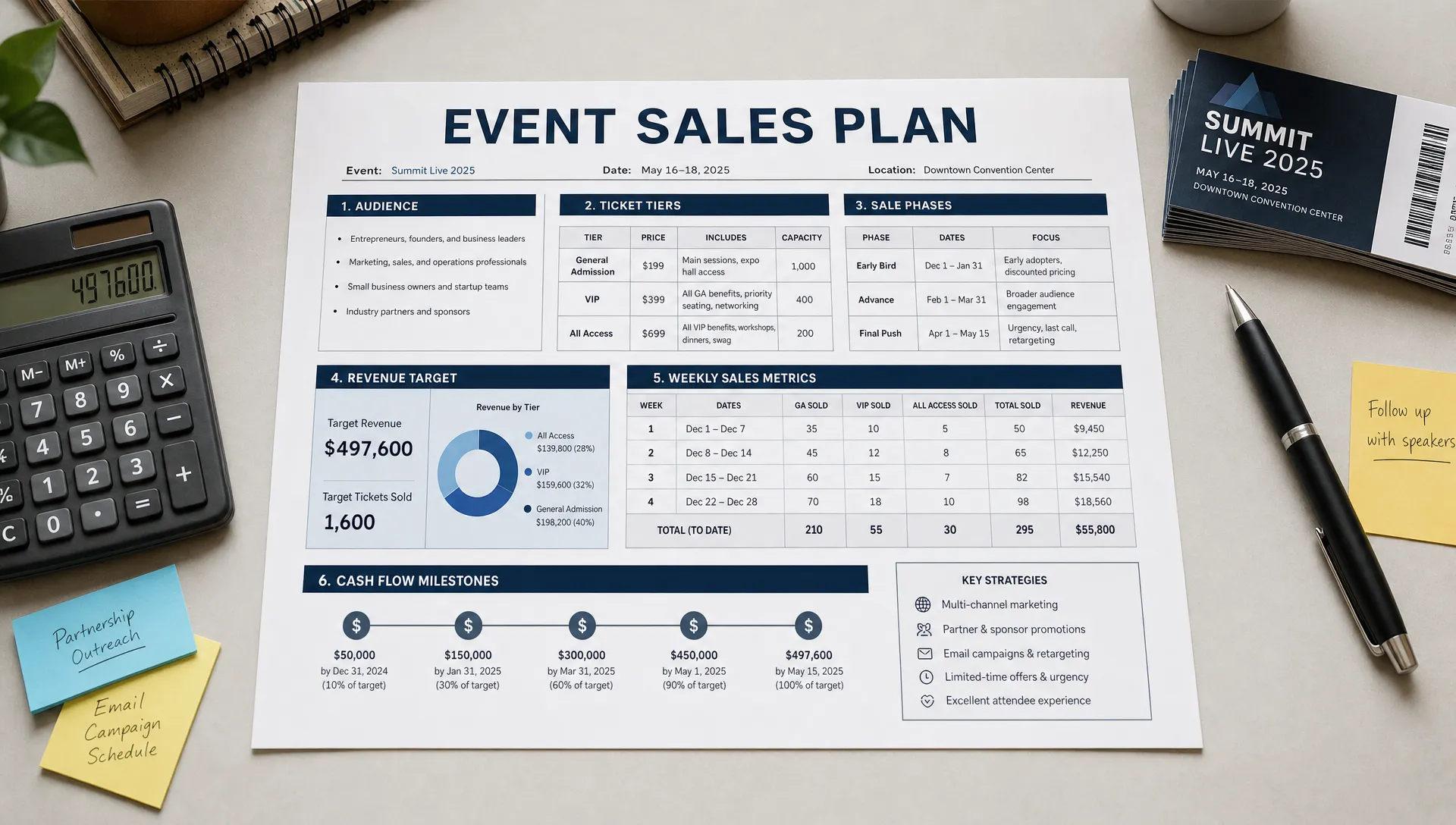
A ticketed event starts as an idea, but it succeeds as a sequence of clear sales decisions. Before the poster goes live or the first announcement hits your audience, you need to know what you are selling, when each offer opens, how much revenue you need by each milestone and what you will do if demand moves faster or slower than expected.
That does not require a complicated spreadsheet or a corporate marketing plan. For most independent organizers, promoters, music producers and venue teams, a simple one-page sales plan is enough to create a ticketed event with more control and less guesswork.
The goal is not to predict every sale perfectly. The goal is to give yourself a practical operating map so your pricing, launch timing, promotion and cash flow all work together.
What a simple ticket sales plan should answer
A sales plan is the bridge between your event concept and your ticket page. It turns broad questions into decisions you can act on: who should buy first, why they should buy now, how many tickets you need to sell early and what happens when each phase ends.
Before you publish your event, your plan should answer five questions:
- Who is the first audience most likely to buy?
- Which ticket types will be available at launch?
- What is the reason to buy early instead of waiting?
- How much cash do you need before each major cost is due?
- What will you change if sales are slow, strong or uneven across tiers?
This is especially useful for live music, club nights, workshops, pop-ups, conferences and community events where the budget depends on early momentum. A sold-out final week is nice, but it does not help much if you needed deposit money three weeks earlier.
Start with the event economics
Many organizers start with the ticket page because it feels tangible. The stronger move is to start with the event economics, then build the ticket page around them.
List every cost you already know. Include venue hire, talent, production, staff, security, insurance, marketing, artwork, hospitality, ticketing fees you absorb and any required deposits. Then separate your costs into fixed costs and variable costs. Fixed costs stay roughly the same whether 50 or 500 people attend. Variable costs rise as attendance increases, such as wristbands, scanning staff, included drinks or per-attendee materials.
Once you know the cost base, estimate the revenue needed to break even and the revenue needed for a successful event. Use net revenue, not only the visible ticket price.
| Planning item | What to include | Why it matters |
|---|---|---|
| Fixed costs | Venue, artists, equipment, design, security, insurance | Sets the minimum revenue target |
| Variable costs | Materials, staff per guest, included items, card or ticket costs you absorb | Shows how margin changes as attendance grows |
| Revenue assumptions | Ticket price, fee treatment, promo codes, comps | Keeps your forecast realistic |
| Cash timing | Deposit dates, final supplier payments, marketing spend | Shows when you need revenue, not just how much |
A basic break-even formula is simple:
Break-even tickets = fixed costs divided by average net revenue per ticket
If your fixed costs are high, you either need more paid attendance, higher average ticket revenue or a lower cost structure. If your cash is tight before the event, timing matters as much as total revenue. That is why a platform with instant payouts and clear fees can be more than a convenience. It can affect when you can confirm suppliers, increase marketing spend or lock in production details.
If cash timing is your main concern, TixFlow has a deeper guide on how ticketed events can build predictable cash flow from ticketed events.
Define the audience and the event promise
A simple sales plan works best when it is built around a specific buyer. Avoid planning for everyone who might possibly attend. Instead, describe the person who is most likely to buy early.
For a music producer, that might be fans of a specific sound, followers of the artists on the lineup or people who already attend similar nights in your city. For a workshop organizer, it might be professionals with a clear problem to solve. For a community organizer, it might be members who already trust the group and need a clear date, location and reason to commit.
Your event promise should be short enough to repeat in a caption, email subject line or ticket page header. It should explain what the attendee gets, why this date matters and why the experience is worth paying for.
For example, a vague promise sounds like this: local DJs, good vibes and drinks all night. A stronger promise sounds like this: a 300-capacity basement session featuring three fast-rising house producers, built for people who want a late-night dance floor without the festival price.
The second version gives your pricing, capacity and promotion a clearer direction.
Build ticket tiers that make buying obvious
Ticket tiers should shape demand, not confuse people. If buyers need to compare too many similar options, they delay the decision. Your plan should give each ticket type a role.
A common structure is to launch with a limited early ticket, move into a standard general admission tier and reserve a final tier for late buyers or door pricing. VIP, group tickets or community tickets can work well, but only if they match the event experience and the audience understands the difference immediately.
| Ticket tier | Best use | Sales plan role | Mistake to avoid |
|---|---|---|---|
| Early ticket | Rewarding fast buyers and building first momentum | Creates urgency and validates demand | Making the discount so deep it weakens margin |
| General admission | Main sales volume | Carries most of the revenue target | Opening too late after early interest fades |
| Group ticket | Friends, crews, teams or community buyers | Raises order size and helps social buying | Making the saving unclear |
| VIP or premium | Better access, seating, perks or bundled value | Increases average revenue per attendee | Selling premium without a real benefit |
| Final release | Late buyers and urgency near event week | Captures demand when attention peaks | Relying on it to save a weak campaign |
If your ticketing platform supports unlimited ticket tiers, use that flexibility carefully. More tiers do not automatically mean more sales. Most events benefit from a small number of clearly different options, each tied to a specific reason to buy.
For more detail on matching ticket formats to your event model, the guide to choosing the right type of ticket covers common ticket types and when to use them.
Set a 3 phase sale calendar
A sales calendar keeps your campaign from becoming one long announcement. Instead of posting the same message repeatedly, you move buyers through phases: early commitment, public momentum and final urgency.
The exact timing depends on the event size, audience habits and how much planning time attendees need. A small local show may only need a few weeks. A conference, destination event or high-production show may need months. What matters is that each phase has a purpose.
| Phase | Typical timing | Main goal | What to prepare |
|---|---|---|---|
| Warm launch | 4 to 8 weeks before smaller events, longer for large events | Sell to the highest-intent audience first | Early tier, direct messages, email list, artist or partner posts |
| Public launch | After early proof of interest | Reach the wider audience and build visible demand | Main ticket tier, event page, social assets, partner announcements |
| Final push | Last 7 to 10 days, or longer for bigger events | Convert undecided buyers and manage remaining capacity | Final tier, urgency messaging, guest list checks, door plan |
Automated sales phases are useful because they remove manual pressure. If your early tier is supposed to close at a set time or quantity, automation helps the plan happen even when the team is busy promoting the event.
For a deeper timing framework, TixFlow explains how to set ticket sale dates for maximum momentum.
Decide what you will measure each week
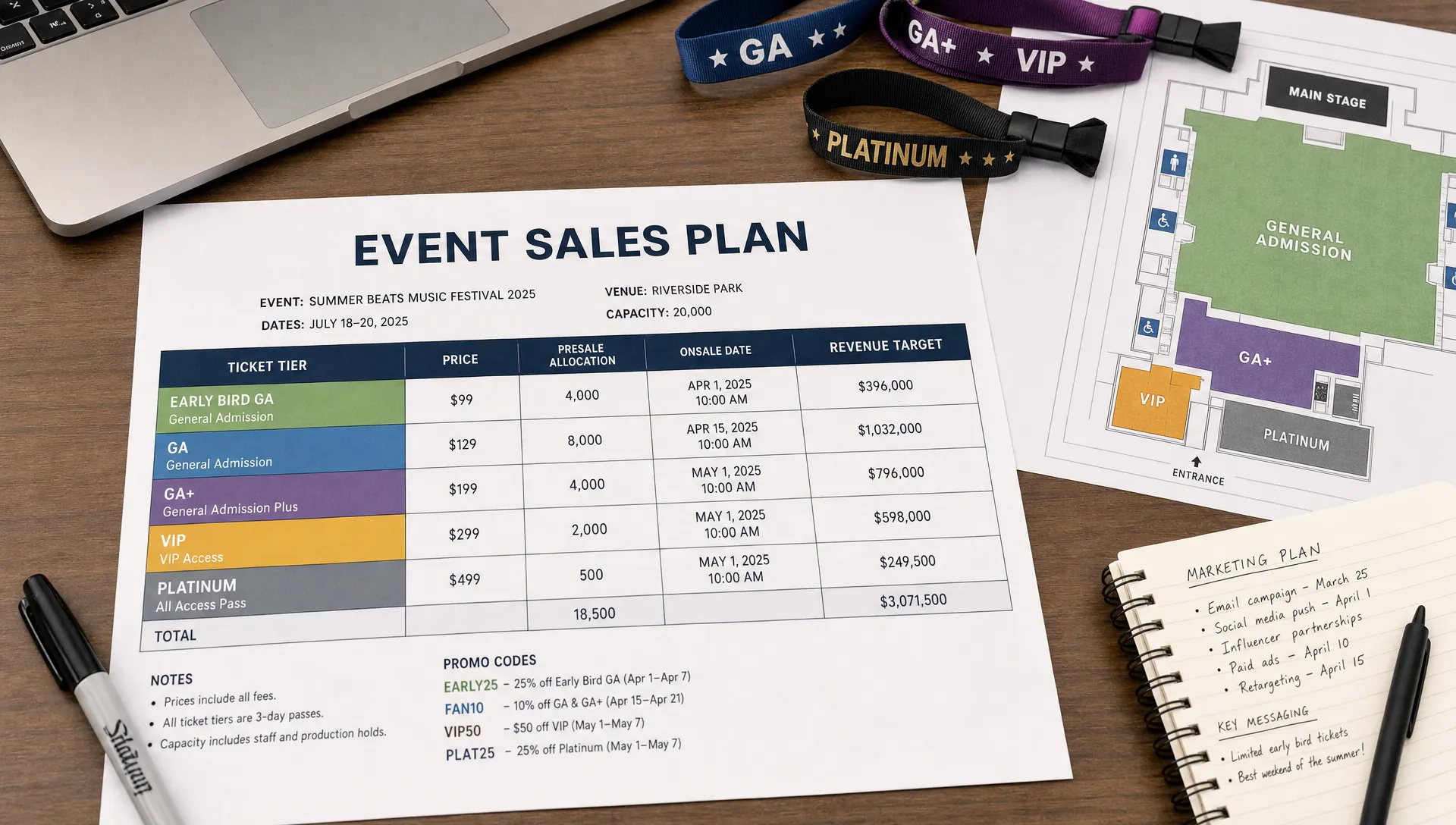
A sales plan should be simple, but it should not be blind. Once tickets are live, review the same small set of numbers each week so you know whether to adjust price, promotion or capacity.
Sales velocity is often the first signal. If you expected early tickets to move quickly but they are flat after launch, your audience may not understand the offer, your channels may be too narrow or the price may not match perceived value. If sales spike faster than expected, you may need to close a tier sooner, increase the next release or protect capacity for partners and production needs.
| Metric | What it tells you | Possible action |
|---|---|---|
| Tickets sold per day | Whether momentum is building or fading | Increase promotion, close a tier or adjust messaging |
| Revenue collected | Whether cash targets are being met | Prioritize high-intent channels or review discount use |
| Tier mix | Which offer buyers prefer | Simplify tiers, extend a tier or promote higher-value options |
| Promo code usage | Which partners or channels convert | Invest more in working channels and stop weak ones |
| Checkout drop-off signals | Whether buyers are hesitating before payment | Reduce friction, clarify details or remove unnecessary questions |
Real-time sales control matters here because event teams rarely have time to wait for slow reports. If a partner code is working, you want to know while there is still time to use it. If a tier is almost gone, you want to communicate that before the moment passes.
Create a promotion plan that matches the sales phases
Promotion should not be a random set of posts. Each sales phase needs its own message and channel mix.
During the warm launch, speak directly to people who already trust you: email subscribers, past attendees, artist communities, members, collaborators and personal networks. The message can be simple because these buyers are closer to the event already. They need the date, the promise, the price and a reason to act first.
During the public launch, your message needs more context. People who see the event for the first time need to understand the lineup, location, format, value and social proof. This is where strong event pages, clear visuals and consistent partner posting do a lot of the work.
During the final push, avoid panic discounts unless they fit the plan. Constant last-minute discounting trains buyers to wait. A better approach is to use scarcity honestly, highlight the experience, show who is involved and make the remaining ticket choice obvious.
Promo codes can be powerful when they have a job. Use them to track a partner, reward a community, support an artist campaign or test a channel. A smart promo code is not just a price cut. It is a measurement tool that helps you understand where paid orders come from.
Remove checkout friction before launch
Even a strong sales plan can lose buyers at checkout. The best time to fix friction is before the announcement, not after people complain.
Buyers should not have to create an account just to pay for a ticket. They should not have to hunt for the date, location, age policy, refund policy or ticket difference. They should not face a long form unless the event genuinely requires that information.
For most ticketed events, the checkout flow should collect only what the organizer needs to issue the ticket and run the event safely. A customizable checkout helps because you can ask the right questions without turning every order into admin work. For example, a workshop may need attendee names and dietary details, while a club night may only need the buyer and ticket quantity.
No buyer registration is especially important on mobile. Many ticket purchases happen in the moment after someone sees a post, receives a text or hears from a friend. If the buying path is slow, the sale can disappear.
Prepare the event operations while sales are live
Ticket sales and event operations should not be separate worlds. The same plan that brings in revenue should help the team prepare the door, capacity and guest experience.
Digital guest lists reduce the risk of messy spreadsheets, missing names and last-minute confusion at check-in. Real-time control helps when you need to pause a tier, add capacity, close sales or update availability. If you are working with artists, hosts, sponsors or community partners, decide who can see what, who handles guest names and when final lists are locked.
The operational side also protects the buyer experience. If the event page promises fast entry, premium access or a limited-capacity room, the guest list and ticket structure need to support that promise at the door.
A one-page ticketed event sales plan template
You can turn everything above into a one-page plan before you create your listing. Keep it short enough that the whole team can understand it.
| Plan section | Decision to make | Example |
|---|---|---|
| Event promise | What buyers are paying to experience | An intimate live showcase for fans of new electronic artists |
| Revenue target | Minimum and success targets | Cover fixed costs by week 2, reach profit target before event week |
| Ticket tiers | Which tickets open and when | Early ticket, general admission, final release, optional premium |
| Sale phases | Timing for each push | Warm launch, public launch, final push |
| Promo plan | Which codes and channels matter | Artist code, partner code, email community code |
| Cash milestones | What must be paid and when | Venue deposit, production balance, marketing spend |
| Weekly review | Metrics you will check | Sales velocity, revenue, tier mix, promo performance |
| Operations | What needs to be ready | Guest list, check-in process, capacity control, buyer emails |
This template is intentionally basic. A plan that gets used is better than a perfect document that sits untouched. Review it after launch, update it when demand changes and use it to make decisions quickly.
Common mistakes when creating a ticketed event
The most common mistake is treating ticket setup as an admin task instead of a sales system. A ticket page is not only a payment link. It is where your offer, pricing, timing and buyer experience meet.
Other mistakes usually come from adding complexity without a clear reason:
- Opening too many tiers at once, which makes buyers hesitate
- Discounting too early, which weakens urgency and margin
- Forgetting cash due dates and only tracking total sales
- Using promo codes without tracking what each code is meant to prove
- Asking buyers for too much information before payment
- Waiting until the final week to check guest list and entry operations
You do not need to solve every issue with a bigger campaign. Often, the fix is a cleaner offer, a better-timed sales phase or a shorter checkout.
Frequently Asked Questions
How do I create a ticketed event if I have never sold tickets before? Start with the basics: define your audience, estimate costs, choose a small number of clear ticket tiers, set launch dates and decide how you will promote each phase. Then build your event page and checkout around that plan.
How many ticket tiers should my event have? Most events only need a few tiers, such as early ticket, general admission and final release. Add VIP, group or community tickets only when the difference is easy for buyers to understand and useful for your sales plan.
When should tickets go on sale? The right timing depends on event size and buyer behavior. Smaller local events may need a shorter runway, while conferences, festivals and destination events usually need more lead time. The key is to give each sales phase a specific goal instead of launching and hoping momentum lasts.
Should I use promo codes for a ticketed event? Yes, if each code has a purpose. Promo codes work best when they track a partner, reward a specific audience or support a limited campaign. Avoid using discounts as a reflex every time sales slow down.
How can instant payouts help event organizers? Instant payouts can help organizers access ticket revenue sooner, which may support deposits, supplier payments and marketing decisions. This is most valuable when your event budget depends on cash flow before the event date.
Create your next ticketed event with TixFlow
A simple sales plan gives you the strategy. TixFlow gives you the ticketing setup to put it into motion with instant payouts, flat per-ticket fees, no buyer registration, real-time sales control, customizable event pages, unlimited ticket tiers, automated sales phases, smart promo codes, digital guest lists and Stripe Connect integration.
If you want to create a ticketed event without adding friction for buyers or extra admin for your team, build your next event with TixFlow. Start with the plan, launch with clarity and manage sales as they happen.